Primary Motives
Small
Mini DV
XGA Stills
Zoom Mic
USB
MMC
Impressions
The Good
The Bad
The Ugly
Other Good Camcorders
Sony PC 110
Canon Elura 2 MC
JVC GR-DVM70u
Still Picture Examples
Program AE Modes
White Balance
Other (Miscellaneous) Info
The Camera in Use
Accessories & Camera Views
Specifications
Menus w/Detailed Capabilities
Tape Formats
Links
DV Primer
Home |
|

I bought one of these digital Mini DV camcorders about a month after they
came out. All the local stores (Good Guys, Circuit City, Best Buy) were
charging $1500 for it, I bought it online and paid less than $1100.
Primary motives:
Small: This one is obvious; I don't want
to lug around a big old behemoth just to capture videos of interesting events.
I want something I can carry in a pocket or attach to my belt. Something
that won't discourage its use by its sheer bulk. Also I want to film
concerts I attend and I figure the smaller the better.
Mini DV: Of course this is the only way to
go these days. Forget bulky analog systems with their low image quality
and degradation from use. Buying another format seems like poor future
planning to me. See FORMAT overview below.
XGA Still Image Resolution: VGA just
doesn't cut it. See below examples. I don't want to have to lug
around multiple cameras, but I like still-images. The only camcorder
currently with better resolution is the Sony PC110 but it's so big you might as
well lug around multiple cameras.
Zoom Microphone Attachment: For concerts.
USB Connector: My friends with digital
cameras tell me of how agonizingly slow it is to transfer still images via
serial cable.
Small Multimedia Card for Still Images: I
can't even imagine how completely unfriendly it must be to work with a camera
that sucks up 6-seconds of your video to capture still images which are
interspersed throughout the regular video. Fill up a card with
images? Carry spares; like film without the developing; except more
expensive.
Impressions: The Good, The Bad, & The Ugly
The Good:
- Small size
- Light weight
- Sturdy
-
Sleek design belongs in a museum for industrial art - just beautiful
-
Integrated lens cover
- XGA still images
- Natural color low light shooting (very
flexible settings available for this)
-
Easily flip between still and video recording
- Eye-diopter adjuster for viewfinder
- Hot-shoe for accessories
- Digital Zoom actually works well beyond the optical range (up to about
30x, not 200x), the camera appears to be doing some sort of
"edge-find" like Photoshop to determine how to represent the image
accurately. Beyond about 30x the image starts to pixelate.
- MMC for still images
- Internal microphone
placement makes more sense than on many small camcorders
- Righties and lefties
can use (not that it matters to this righty)
- USB
- I.Link.
- Beautiful Output. Color is good, picture clean, etc.
The Bad:
- XGA still image quality could be better
- No progressive scan mode (has a "sport" mode which is similar)
- Short battery life (what can you do here? its small)
- Menus and menu
buttons more difficult to use than they should be
- Bigger screen would be better
- Digital sounds built-in (what is this for? America's Funniest Home
Videos" TV show?), stupid
- AC is supplied to power the camera by a fake battery with a cord that
connects to the charger
The Ugly:
- No threads for filters - most people that use filters with their
camcorder attach a UV filter to
protect the lens (UV rays are normally something which affects standard
photo film, I don't know what effect they would have on a CCD, if any); I
like to attach a polarizing filter to deepen colors and clean up the sky
during outdoor shooting
- No built-in flash like JVC GR-DVM70
- No analog in (just analog out)
- For a $1700 list price you'd think the cheap bozos at JVC
could have thrown in a case
Other Notable Camcorders I was Considering
Sony PC110: Sony quality. Best still-image resolution around. Zeiss
lenses. Too big for me.
Canon Elura2 MC: Nice camera. Small. I use and love my Canon 35mm
film cameras. This camcorder also has some very still-camera like
features, like the ability to shoot with an open aperture to isolate a subject
from its background, like in portrait photography. Of course the VGA
resolution sort of limits the usefulness of having ANY advanced still-image
features. This camcorder also has analog in, a big plus. Didn't buy this over the JVC because the Canon has: no
built-in lens protector; VGA-only still resolution; bigger than JVC; funky
low-light mode; bad internal microphone placement; weird looking. This
camera was a very close second. The analog-in almost outweighed the VGA
still resolution; I have video capture on my PC, so I can do that instead and
send it to the GR-DVP3u via I.Link.
JVC GR-DVM70u: Bigger than GR-DVP3u, but still small. Built-in
flash. Bigger display. Snazzy auto lens cover. No USB (uses
that weird JLIP thing, whatever that's all about) and VGA only.
Still Picture Example: Click on Thumbnail Image for Original Picture
These are pictures from my backyard taken on a somewhat overcast day without
cloudy white-balance correction:
flowers, my Doberman, bird-bath, etc. The quality is the best the camera
can do: XGA/Fine. The pictures look better when the colors are similar,
like the dog. When there is stark color contrast, the .JPG logic used
seems to have more difficulty properly determining color gradations.


These are pictures of a computer speaker and quartz crystal sitting on my
desk, one VGA the other XGA to show the difference between the two output
formats. Notice that the XGA isn't fantastic: as near as I can figure the
camera is doing some pixel interpolation. The result isn't as good as a
1024x768 still camera, but is still better than regular camcorder VGA.
Good enough for snapshots.


Program AE Modes Available
- Slow - Brightens dark areas
- 4X Slow - Brightens dark areas more
- 10X Slow - Brightens dark areas even more
- Night Alive - Brightens dark areas most. Slows shutter down to
capture full color video, but with fewer frames/second.
- 1/60 Shutter Speed - For shooting a video that contains a TV, reduces
strobing of black-lines on image of TV
- 1/100 Shutter Speed - For shooting under fluorescent or mercury-vapor
lights to reduce video flicker
- Sports - Variable fast shutter speed between 1/250 and 1/4000 for
capturing fast moving subjects or for later frame-by-frame video analysis
- Snow - Compensates when background is so light would cause subject to be
too dark
- Spotlight - Compensates when subject with spotlight would appear too
bright
- Twilight - Changes White Balance to make scenes shot at dusk appear more
natural, changes focus behavior, turns off flash
- Sepia - Makes video look brown, like in olden times (modern technology!)
- B/W Monotone - Black and white video mode
- Classic Film - Strobes film, like old movies
- Strobe - Video looks like a series of snapshots (why?)
- Video Echo - Adds a repeating video ghost after images, like "acid
trails"
White Balance
- Auto - Camera adjusts balance
- Manual - You adjust it by having the camera "look" at a white
sheet of paper under the appropriate light source
- Fine - Outdoors on a Sunny Day
- Cloud - Outdoors on a Cloudy Day
- Halogen - Under artificial video lighting
Other Information
- Fail-Safe Mode - I was in the Bahamas, the camera says it is rated for up
to 80% humidity, so I check the local humidity reading and it was 95%.
I took the camera out and tried to use it: it reported "Stand By, Fail
Safe Mode: Condensation Detected, Please Wait." It detected
the humidity and didn't want to work for about an hour and a half, after
which it worked fine.
Use
I find the battery life from the included slim battery is just fine for most
use. It lasts an hour (the length of an SP tape) and is just perfect for
most usage. Most of my day trips don't include a whole hour of video taping.
Its funny to watch folks carry around the vast bulk of most camcorders.
Mostly they act like they're news cameraman, and seem pathetically out of place.
I taped a concert like I was planning and it worked out fine. The only
thing that let me do it was the small size of the camera. I palmed the
camera sometimes or set it on the table in front of me. A bouncer even
asked me "Is that a video camera" I replied "Uh-uh, no! It's a
still camera!" They bought it.
The small size really does make a huge difference. You can slip this in
your pocket easily and be ready anytime you want to videotape. My hats off
to JVC!
The camera has a ring you move to select PLAY OFF AUTOMATIC &
MANUAL. PLAY views the still images or video depending upon setting of
Video/Still switch (switch 12 below), OFF turns camera off, AUTOMATIC takes
pictures using default camera settings, & MANUAL takes pictures using your
settings. I always use MANUAL to make sure the camera is using my
preferences, but AUTOMATIC could be handy for grab-and-shoot. Note that
leaving the switch on PLAY will drain the battery.
Accessories, Views of the Camera
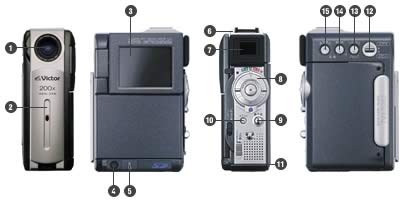
- Lens
- Lens Cover
- Screen
- Analog A/V Jack
- I.Link Jack
- Info-Shoe
- Viewfinder
- Zoom/Forward-Rewind Control w/Record-Play Button
- Snapshot Button
- Stop/Digital Sound
- MultiMediaCard Door
- Video vs. Still-Photo Switch
- Focus Override/Blank Spot Find
- Exposure Lock/Volume +
- Backlight Compensation/Volume -
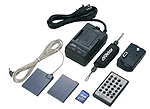 Included accessories left to right (above
picture): battery adapter provides power to camcorder from AC (do this &
camcorder won't shut off after 5 minute auto-off so you can transfer video or
whatever); slim battery 30-60 minute power (BN-V1070; AC adapter/battery charger
charges 1 battery at a time (slim battery takes about an hour); 8Mb MMC for
still-images; hand strap for easier camcorder holding; remote control to control
camera and/or a VCR for editing; docking station includes connectors for USB,
headphones, S-Video and Edit (to control VCR when doing a "Random
Assemble" output, like you're taking certain scenes from vacation video and
creating a more coherent "Vacation Video." Also included but not
shown are: analog A/V cable; headphone cable; carry strap that screws into
tripod mount beneath camcorder, and batteries for remote. Included accessories left to right (above
picture): battery adapter provides power to camcorder from AC (do this &
camcorder won't shut off after 5 minute auto-off so you can transfer video or
whatever); slim battery 30-60 minute power (BN-V1070; AC adapter/battery charger
charges 1 battery at a time (slim battery takes about an hour); 8Mb MMC for
still-images; hand strap for easier camcorder holding; remote control to control
camera and/or a VCR for editing; docking station includes connectors for USB,
headphones, S-Video and Edit (to control VCR when doing a "Random
Assemble" output, like you're taking certain scenes from vacation video and
creating a more coherent "Vacation Video." Also included but not
shown are: analog A/V cable; headphone cable; carry strap that screws into
tripod mount beneath camcorder, and batteries for remote.
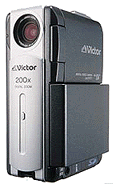 Camcorder with
long-life (BN-V114) battery. Camcorder with
long-life (BN-V114) battery.
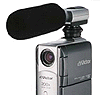 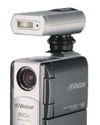 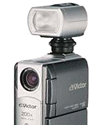 Optional
Accessories: Zoom microphone; flash; video light. Optional
Accessories: Zoom microphone; flash; video light.
Specifications
|
Signal system |
NTSC (Standard signal system of Japan/ U.S.A.)
|
|
Recording system |
Mini DV format (Consumer digital VCR SD format) |
|
Video signal recording |
Digital component recording
|
|
Audio signal recording |
PCM Digital recording 16bit 2 channels,12bit 4 channels
|
|
Image sensor |
1/4" 680,000-pixel CCD
(Effective area approximately 340,000 pixels for both motion and still pictures)
|
|
Lens |
F 1.8 (f = 3.7 ~ 37mm), 47.5mm - 475mm at the conversion rate of 35mm
(Filters and conversion lens cannot to be installed.)
|
|
Zoom magnification |
10x (optical zoom), 200x (digital zoom)
|
|
Monitor |
2" 200,000-pixel Polycrystalline Silicon color LCD monitor
|
|
Viewfinder |
0.44" 113,000-pixel Polycrystalline Silicon color LCD viewfinder
|
|
Power source |
DC 6.3V (using AC Adapter), DC 7.2V (using Battery Pack)
|
|
Power consumption |
4.1 W (using viewfinder), 5.0 W (using LCD monitor)
|
|
Continuous recording time *1
(Actual recording time *1) |
Using viewfinder:
(BN-V107) approx. 1 hr. 10 min. (approx. 35 min.)
(BN-V114) approx. 2 hr. 20 min. (approx. 1hr. 10 min.)
(VU-V840KIT) approx. 6 hr. 20 min. (approx. 3 hr. 10 min.)
(VU-V856KIT) approx. 9 hr. 20 min. (approx. 4 hr. 40 min.)
Using LCD monitor:
(BN-V107) approx. 1 hr. (approx. 30 min.)
(BN-V114) approx. 2 hr. (approx. 1 hr.)
(VU-V840KIT) approx. 5 hr. 10 min. (approx. 2 hr. 35 min.)
(VU-V856KIT) approx. 7 hr. 40 min. (approx. 3 hr. 50 min.)
|
|
Still picture compression system
Still picture recording size
(using a memory card) |
JPEG compliant, DCF
XGA (1024 X 768 dots, pixel density transforming system)
VGA (640 X 480 dots)
|
|
Number of still pictures *1
(using a Memory Card) |
Shooting with XGA : Standard picture quality (Fine Mode)
       SD Memory Card                   MultiMedia Card
8MB*2 : approx.51 (approx.16)       approx.74 (approx.24)
16MB : approx.140 (approx.46)      approx.150 (approx.49)
32MB : approx.295 (approx.97)      approx.305 (approx.100)
64MB : approx.610 (approx.195)           ---          ( --- )
Shooting with VGA : Standard picture quality (Fine Mode)
       SD Memory Card                   MultiMedia Card
8MB*2 : approx.105(approx.37)      approx.150(approx.53)
16MB : approx.290 (approx.100)    approx.310 (approx.105)
32MB : approx.610 (approx.210)    approx.630 (approx.215)
64MB : approx.1255 (approx.435)         ---          ( --- )
|
|
Dimensions |
43 (W) x 115 (H) x 80 (D) mm (Including maximum protrusion)
|
|
Weight |
Main unit: Approx. 340g
During shooting operation: 410g (including Battery Pack, Mini DV Cassette, Handstrap)
|
|
Input and output terminals |
AV output terminal (Ø3.5mm mini-plug), S-video terminal *3,,,
DV terminal (i.LINK), edit terminal*3, USB terminal , USB terminal
, USB terminal
(standard B type)*3,
headphone terminal*3, Info-Shoe (for a compliant accessory) |
Menus
Wipe/Fader - Right to left, left to right, pixelate, fade
etc. Too many scene wipes to include.... If you ask me, this
kind of feature is fluffy bullshit.
Program AE - See above
White Balance - See above
Sound Mode
----> 12 Bit - Records Stereo sound on 2 tracks, leaving 2 tracks open
for dubbing
----> 16 Bit - Records Stereo sound on 2 tracks at 48Khz, no dubbing
possible
Zoom
----> 10x - Uses only the optical range of the camera. This is
the highest quality setting.
----> 40x - Uses the camera's 10x optical, and 40x digital range.
As mentioned previously, the camera has a good zoom to about 30x, so this
is a reasonable setting, though the 30x to 40x range will start to
pixelate.
----> 200x - Marketing bullshit. Why? Pixelates heavily.
Snap Mode
----> Pinup: Puts a "picture frame" and a "shadow"
around the picture. Why? Stupid consumer bullshit.
----> Frame: Puts a "picture frame" around the picture.
Why? Stupid consumer bullshit.
----> Full: Normal. A picture takes the full frame.
----> Multi-4: Camera shoots 4 frames in rapid succession and puts them
on one picture. Good for "analyzing golf swings" and
for???
----> Multi-9: Camera shoots 9 frames in rapid succession and puts them
on one picture. Good for "analyzing golf swings" and
for???
Gain Up
----> Off - No picture brightness augmentation for dark scenes
----> AGC - Image may be grainy, but bright
----> Auto A - Shutter speed automatically adjusted in low light, more
gain than AGC
Dis - On/Off Compensates for hand shake
5S - For taking 5 seconds of video (why?) and for doing animation like
"Gumby."
Tele Macro - On/Off Autozoom to bring macro subject in focus
Wide Mode
----> Off: Normal 4:3 TV mode.
----> Cinema: If you have a normal 4:3, but want to display as 16:9
cinema.
----> Squeeze: If you are one of the lucky cutting-edged-bastards that
has a 16:9 TV. Will appear "squeezed" on a normal 4:3 TV.
Wind Cut - On/Off For use when windy to cut wind-noise
Beep - On/Off/Melody
Tally - On/Off: If ON a little red light next to the lens will light when
recording.
Demo Mode - On/Off: For store display. Runs through the features on
the display.
Cam Reset - Reset settings
Sound In
----> Mic - Use camdorder's built-in microphones
----> Digital Sound - Use digital sound effects from memory card (stupid)
On Screen
----> LCD: Built-in LCD display
----> LCD/TV: Both built-in LCD and an attached TV
Date/Time
----> Off
----> Auto - Displays when first turned on.
----> On - Always displayed.
Time Code - On/Off: Display or don't display. All DV camcorders
record a time-code track along with the normal recording, similar to
professional movie or SMPTE recording. The camera uses this to
synchronize recordings and potentially external devices.
Clock Adj. - Change the time.
DSC Quality - Fine/Standard: Digital Still Camera picture quality.
DSC Image Size - XGA/VGA
DSC Record Select - Tape/MMC or Tape: Record still images to the
MultiMediaCard or to tape. Recording to tape seems so profoundly
stupid as to be worthless of consideration. So for "TAPE"
setting consider this: You're in the Bahamas video taping your sweetie
frolicking on the beach, you hit still-image, and the camera takes the
next 6 seconds of video to record a single still image or your
honey. I record everything to a 64MB card I purchased. The
camera comes with a 8Mb, which seems too small to me.
Camcorder Tape Formats
VHS - Analog, low resolution (240 to 270 lines)
VHS-C - Analog, Same as VHS, but a smaller cassette. The "C" means
Compact
S-VHS - Analog, medium resolution (400 line), tape same size as VHS (ie BIG)
8mm - Analog, low resolution (240 to 270 lines), tape is small
Hi-8 - Analog, medium resolution (similar to S-VHS), small tape, best
non-digital choice
Mini-DV - Digital, high resolution (500 lines), very small tape
Links
www.jvcservice.com/custrel/download.htm
- JVC video camera drivers. Courtesy Eric Lesniewski.
More to follow....
|


